A Deep-Dive into BxBFFT Configuration

BxBFFT Configuration via the AMD/Xilinx IP Integrator

The BxBFFT is far easier to instantiate and configure than other comparable FFTs.

It can be instantiated either through RTL or through the AMD/Xilinx Vivado IP Integrator. The RTL supports two interfaces, either AXI-S or a BxB custom interface. The IP Integrator only supports the AXI-S interface.

For RTL instantiation, Details are Here. The remainder of this page shows BxBFFT instantiation and customization via IP Integrator. When a BxBFFT is added to IP Integrator, its icon looks like this:
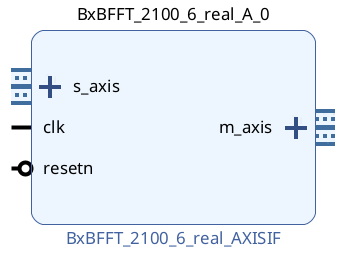
BxBFFT Config Icon This is the icon that appears when a BxBFFT is instantiated in a Block Design using the IP Integrator. Typical designs need to only connect the inputs and outputs, and then compile and run.

The BxBFFT accepts input data on an AXI-S stream and produces FFT output data on an output stream. Depending on parameter selection, additional inputs and outputs will appear. For example, if run-time dynamic gain control or gain monitoring are selected, signals for those operations will be seen on the BxBFFT's icon.

The BxBFFT has a large number of controls, but they are easy to use. The controls default to values that work for most applications, and thus they don't need to be touched unless a special feature is desired or a design has trouble meeting timing closure. Leaving controls at their default values is easy and is typical.


Configuration Tabs

"Main" Tab

Double-clicking on the icon brings up the configuration dialog for the BxBFFT. There are several tabs across the top: "main", "in", "out", "gain", "pipelining", "memory" and "multi-vector". This layout keeps the controls organized. Each of these tabs selects controls appropriate to that function.

The "main" tab comes up first. It has top-level options and options that don't fit perfectly into other categories. The items that are shaded out on the "main" tab are for information only. They are selected at delivery time and can't be changed without a new delivery.
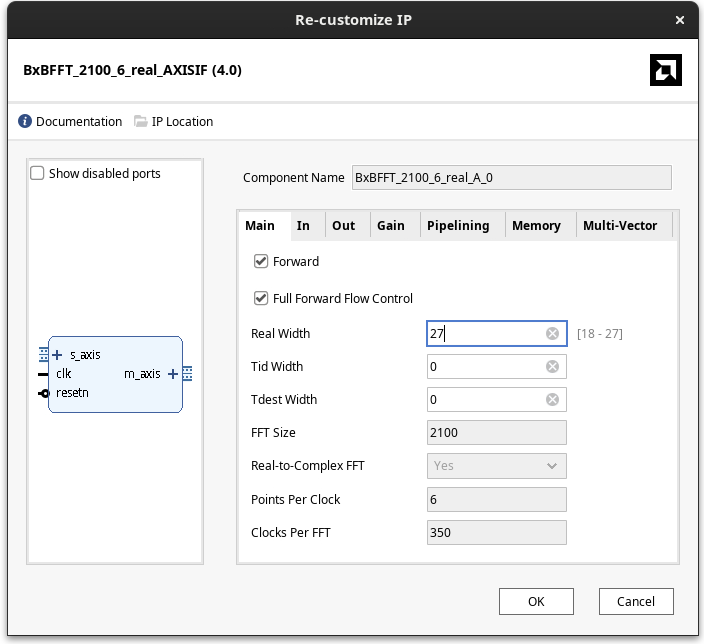
BxBFFT Config Main

  • "Forward": This selects a forward or inverse FFT. For a complex-to-complex FFT this selects only the FFT exponent. For a real-to-complex FFT this also selects whether the FFT is real-to-complex or complex-to-real.
  • "Full Forward Flow Control": This selects whether the AXI-S "tvalid" signal may be de-asserted on any sample or only between vectors.
  • "Real Width": This selects the number of bits for each real data sample in internal BxBFFT processing. Complex samples have twice this number of bits.
  • "Tid Width", "Tdest Width": These select the number of bits of sideband information. This data is treated as valid only at the start of each FFT.


Configuration Tabs

"In" Tab

The "in" tab has parameters describing the input data. The grayed-out items are dependent on other selections.
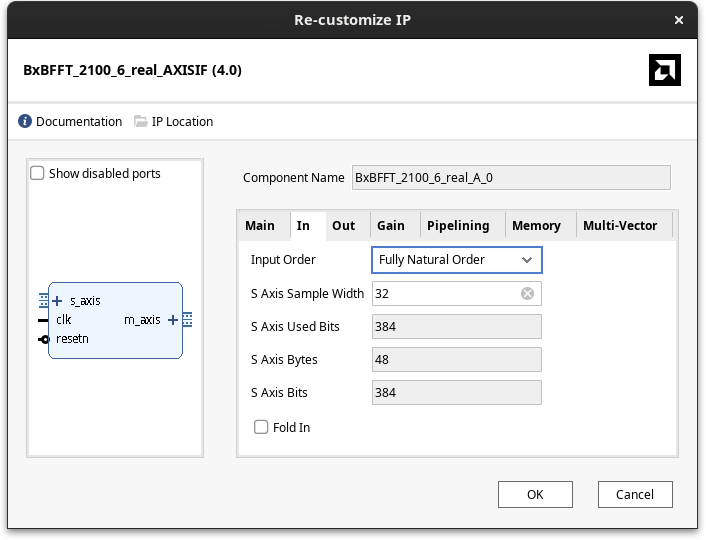
BxBFFT Config Main

  • "Input Order": This selects between three supported data orders, "Fully Natural Order", "Partially Natural Order", and "Scrambled Order". The easiest to work with is "Fully Natural Order", which is the default.
  • "S Axis Sample Width": This selects the width of real samples on the AXI-S input. This may be larger or smaller than "Real Width". The high bit of the input data is placed into the high bit of "Real Width", subject to the selections on the "Gain" tab.
  • "Fold In": This selects whether input data has the zero index in the center or at the start. For a complex-to-real (inverse) FFT it can also flip data for 2nd Nyquist zone operation.


Configuration Tabs

"Out" Tab

The "out" tab has parameters describing the output data. The grayed-out items are dependent on other selections.
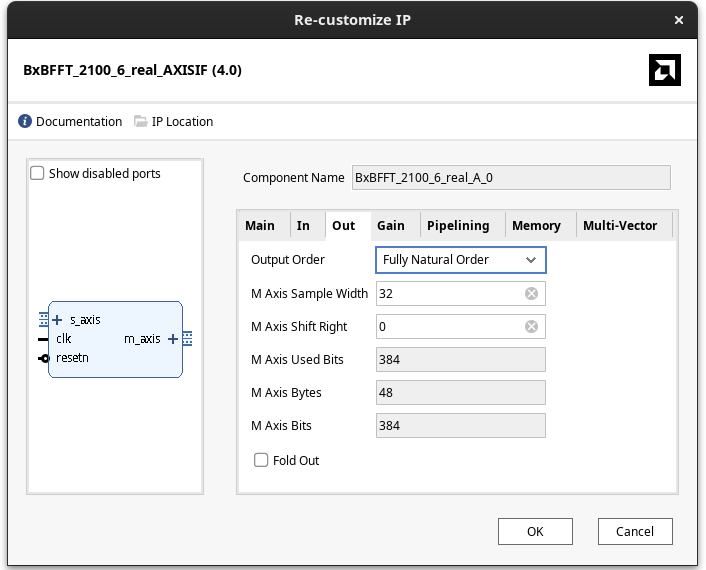
BxBFFT Config Main

  • "Output Order": This selects between three supported data orders, "Fully Natural Order", "Partially Natural Order", and "Scrambled Order". The easiest to work with is "Fully Natural Order", which is the default.
  • "M Axis Sample Width": This selects the width of real samples on the AXI-S output. This may be larger or smaller than "Real Width".
  • "M Axis Shift Right": This selects how bits of "Real_Width" are matched to bits of "M Axis Sample Width". If it is zero, the high bits of each are aligned. If it is positive, the values will be reduced in amplitude at the output. If it is negative, excess margin at the top of "Real Width" will be eliminated by shifting left.
  • "Fold Out": This selects whether output data has the zero index in the center or at the start. For a real-to-complex (forward) FFT it can also flip data for 2nd Nyquist zone operation.


Configuration Tabs

"Gain" Tab

This tab is for managing amplitude in the BxBFFT by controlling FFT gain. It is imporant to manage amplitude through any fixed-point FFT. If amplitudes are too low, there is excessive noise from rounding error. If amplitudes are too high, there is too great a risk of overflow. If amplitudes are managed appropriately, a fixed-point FFT is generally far more accurate than a floating-point FFT with similar resource utilization.

BxBFFT gain control is significantly simpler than with any other FFT. FFT gain control is fundamentally about countering signal gain within the FFT. This gain varies by signal type. To keep things simple, the BxBFFT allows selection of the signal type, and automatically sets appropriate controls based on that type. The more-difficult-to-use raw amplitude shift controls are available with the BxBFFT for unusual circumstances, but they are not a requirement. Other FFTs allow only these more-difficult-to-use controls (if they allow control at all). The easy-to-use but powerful BxBFFT controls make it much more likely that controls are set correctly, ensuring maximum FFT performance.

Simplified gain controls are especially important for non-power-of-2 FFTs. For these FFTs, desirable gain corrections vary depending on the radix organization of the FFT, and thus shift schedules are hard to set manually. The BxBFFT's simplified gain control parameters solve this issue.

Default settings are to provide the lowest noise for which the risk of overflow is zero.
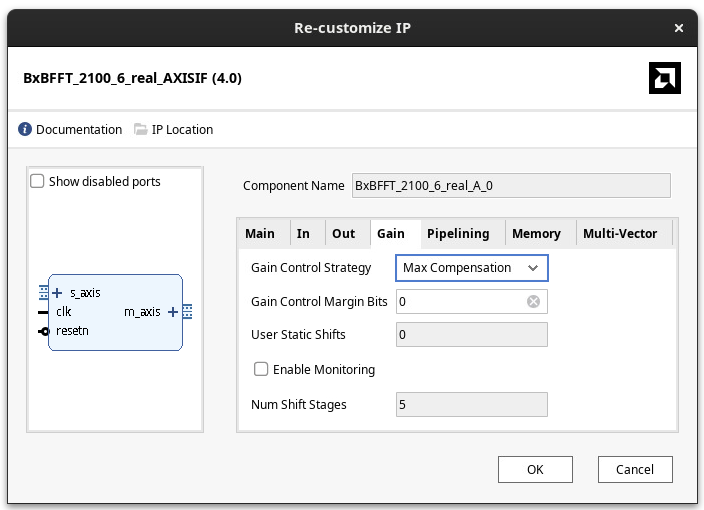
BxBFFT Config Main

  • "Gain Control Strategy": This sets the gain control strategy based on the signal type. The default is a worst-case signal type, such as a sinusoidal input, which requires maximum compensation. If the signal type is random or impulse-like in nature, amplitude gain throughout the FFT is lower. Gain control strategies are available for 10 different steps of signal gain that more appropriately compensate for these lower-gain signals.
  • "Gain Control Margin Bits": This selects the number of bits of margin that are provided against overflow, in case signal amplitudes are randomly higher than allowed for by the "Gain Control Strategy".
  • "User Static Shifts": One setting of "Gain Control Strategy" is for more direct user control of the amplitude shift schedule. In this mode, this selects the shifts. Another setting allows run-time amplitude control, in which case this is an additional shift to the run-time selections.
  • "Enable Monitoring": Selecting this enables additional signals to detect amplitude levels in each stage of the BxBFFT, that provide information about overflow and margin.
  • "Num Shift Stages": This is for information only. It's the number of places within the BxBFFT at which amplitude can be controlled.


Configuration Tabs

"Pipelining" Tab

This tab selects pipelining options. The BxBFFT is already highly pipelined, but in cases of extreme utilization or extreme congestion additional pipelining helps meet timing. This is done by inserting additional registers either globally or at individual stages. These additional registers split long data paths and thus reduce timing requirements to get to distant resources in an FPGA.
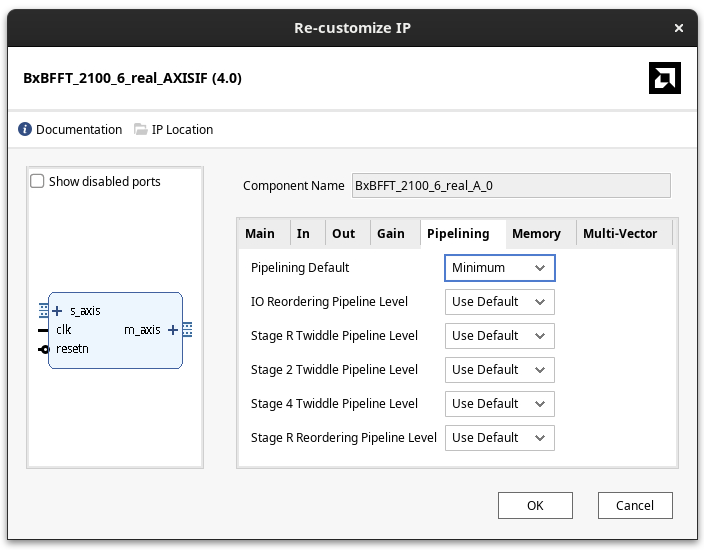
BxBFFT Config Pipelining

  • "Pipelining Default": This is the global setting for pipelining level. It defaults to 0, "Minimum", and has additional settings of "Small" (1), "Medium" (2), "Large" (3), and "Extra Large" (4). Setting large values globally can result in meeting timing better in congested designs, but it uses extra register resources and thus can also increase congestion. Thus it should be used carefully, or instead settings for each BxBFFT stage should be used to target specific problem areas..
  • "XXX Pipeline Level": There are a number of additional pipelining settings, for each particular BxBFFT stage. These can be left at "Use Default", to make them follow the global setting. Alternately, they can be set individually to desired values to override the global setting.


Configuration Tabs

"Memory" Tab

The BxBFFT's memory options control tradeoffs between LUT RAM, BRAM, and URAM either globally or at individual FFT stages. For very long FFTs coefficient storage in ROMs becomes costly, so there are options to generate coefficients on-the-fly instead of storing them in ROMs.

The purpose of the "memory" options is to help designs close by allowing a customer to select memory types appropriate to the customer's design. For example, if BRAMs have high utilization, the BxBFFT can be configured to push more memory into LUT RAM and/or URAM to free up BRAM.
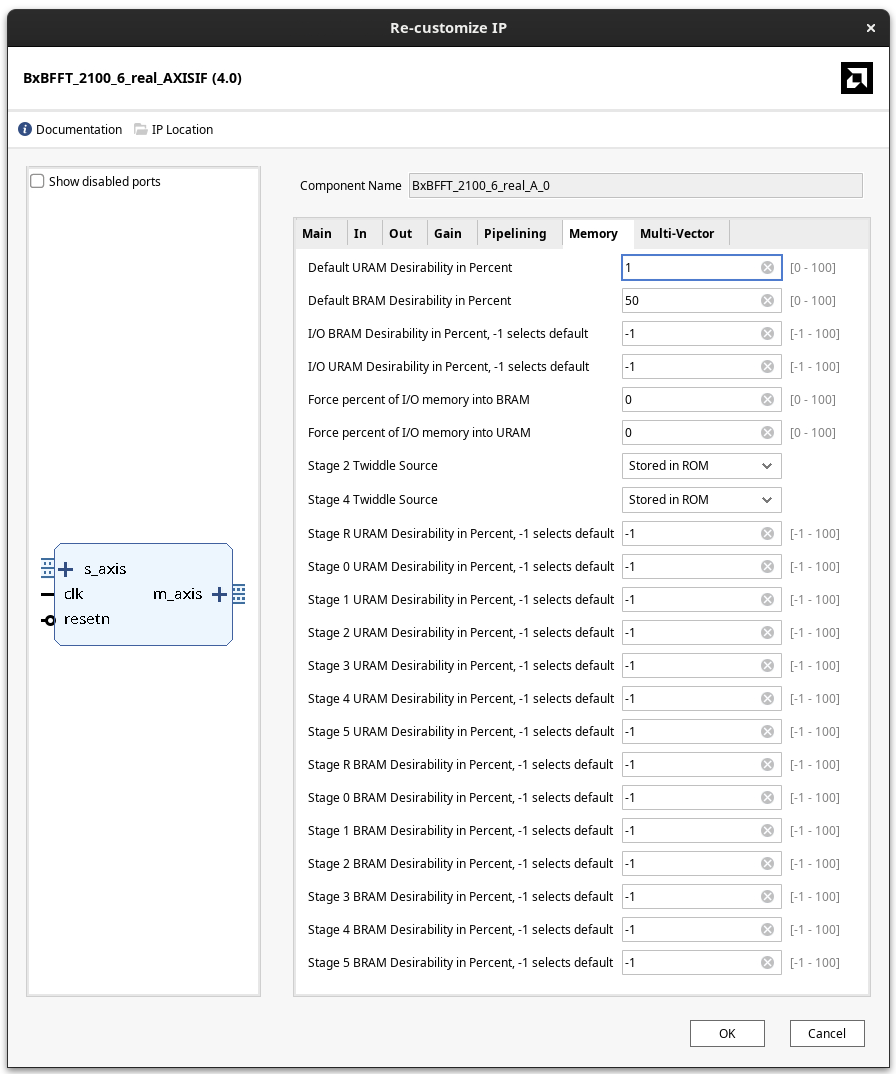
BxBFFT Config Pipelining

  • "Default URAM Desirability in Percent": This is the global setting for URAM desirability. Whether memory is put into URAM or not is based on a calculation of how efficient it is to have the memory in URAM. This parameter weights those scales, with high values up to 100% encouraging a selection of URAM and low values down to 0% discouraging it.
  • "Default BRAM Desirability in Percent": This is the global setting for BRAM desirability. Whether memory is put into BRAM or not is based on a calculation of how efficient it is to have the memory in BRAM. This parameter weights those scales, with high values up to 100% encouraging a selection of BRAM and low values down to 0% discouraging it. Note that an attempt is made to put memory in URAM before BRAM is given a chance. If it fails to be put in BRAM, it is put in distributed LUT RAM.
  • "XXX URAM/BRAM Desirability in Percent": There are a number of additional memory desirability settings, for each particular BxBFFT stage. These can be left at "Use Default", to make them follow the global setting. Alternately, they can be set individually to desired values to override the global setting.
  • "Force percent of I/O memory into URAM/BRAM: For very fine control of the URAM/BRAM balance, these controls allow a certain percentage of I/O memory to be placed into URAM or BRAM. This is useful to get a BxBFFT to fit when almost all memory is used up.
  • "Stage XXX Twiddle Source: This selects between storing twiddles in ROM or using on-the-fly twiddle generation to create them. The default is usually "Stored in ROM", although very long FFTs may default to "Generated on the fly" for stages with large twiddle tables. There are always many stages with small twiddle tables. Selecting on-the-fly generation for stages with small twiddle tables is counterproductive.


Configuration Tabs

"Multi-Vector" Tab

The Multi-Vector tab allows the final stages of a BxBFFT to be turned off. If the product of the radices of the disabled radix stages is R, then this causes a BxBFFT of size FFT_Size to be split into R shorter FFTs, with the length of each shorter FFT being FFT_Size/R. For this split, all R shorter FFTs use the same twiddle tables, so some resource savings is achieved over separate FFTs. However, at the moment output data orders aren't as controllable.

Disabling of stages can also be done dynamically. This allows for a limited amount of dynamic FFT sizing.

Note that this setting is not compatible with real-to-complex FFTs, and thus settings should be left at the defaults for those FFTs.
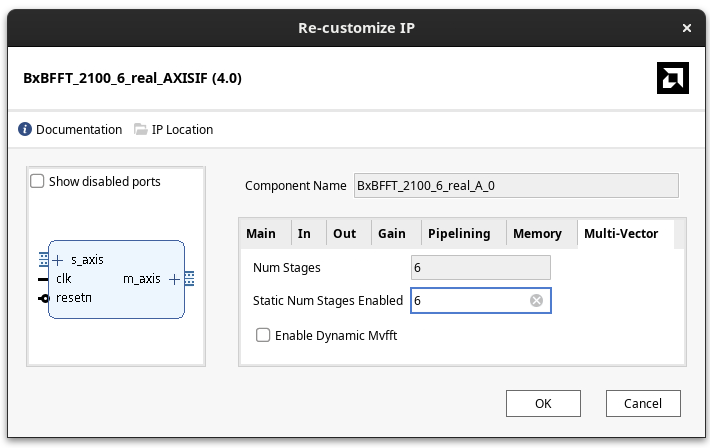
BxBFFT Config Pipelining

  • "Num Stages"": This is the number of stages in the full FFT. It's here for reference, and is not changeable.
  • "Static Num Stages Eanbled": This is the number of stages that are enabled, set at compile time.
  • "Enable Dynamic Mvfft": Setting this adds additional input signals, which control the enabled stages dynamically. Note that stages that are disabled with "Static Num Stages Enabled" cannot be enabled dynamically.


The Bottom Line

Conclusions

The BxBFFT has an industry-leading number of features and configuration options. They are implemented in a well-thought-out fashion to provide expert level results with minimal expertise and effort.